

Let’s be honest for a moment. You’ve probably spent hours staring at the same page of your textbook, only to realize you haven’t actually absorbed a single word. Or maybe you’ve stayed up until 3 AM making “aesthetic” handwritten notes, only to feel completely exhausted during your actual study session the next morning.
In India, we are often taught that the only way to get better marks is to study “harder”—meaning more hours, more books, and more rote memorization. But the truth is, the toppers in your class usually aren’t studying more; they are studying smarter.
In 2026, being a “good student” isn’t just about how much you can memorize. It’s about how well you can use the digital world to your advantage. At Techziee, we believe that mastering a few simple tech skills for students can be the difference between a stressful exam season and a confident one.
Here are the 4 essential digital skills for exams that will help you turn technology into better marks.
1. Digital Information Filtering & Fact-Checking
We live in an age of information overload. If you search for “Laws of Motion” on YouTube, you’ll find 5,000 videos. If you search for it on Google, you’ll get millions of results. The problem for most students isn’t finding information; it’s finding the right information.
Why It Helps in Exams
Exams like the CBSE Boards or competitive tests like JEE and NEET require precision. If you study from an outdated source or a website with incorrect formulas, you are setting yourself up for failure. Mastering “Search Literacy” allows you to find high-quality, syllabus-aligned material in minutes rather than hours.
Real Student Example
Imagine Rohan, a Class 12 student. He spends two hours reading a blog post about organic chemistry reactions, only to realize later that the mechanisms described were for college-level students and weren’t even in his NCERT syllabus. If Rohan knew how to use advanced search filters and verify sources against his official syllabus, he could have saved those two hours for actual practice.
Tools or Platforms
-
Official Educational Portals: (Like NCERT or state board sites).
-
Search Operators: Learning to use “site:.edu” or “filetype:pdf” to find actual academic papers and sample papers.
-
Academic Search Engines: Tools that focus only on verified journals and educational content.
Mistakes Students Make
The biggest mistake is clicking the very first link on Google and assuming it’s 100% correct. Students also often forget to check the “last updated” date on articles, which is risky for subjects like Economics or Geography.
2. Advanced Prompting for Concept Simplification
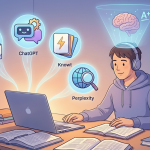
Using AI tools for students isn’t about letting a computer do your homework. It’s about using technology as a 24/7 personal tutor. The skill here isn’t just “using AI”—it’s knowing how to talk to it so that it explains a concept in a way your brain understands.
Why It Helps in Exams
Sometimes, a teacher’s explanation or a textbook’s definition just doesn’t “click.” This skill allows you to take a difficult concept—like “Double Circulation” in Biology—and ask the technology to break it down into a story, an analogy, or a simple table. This leads to deep understanding, which is the key to exam success.
Real Student Example
Priya struggled with Physics numericals. Instead of just looking up the answers, she started using tech to ask: “Explain the logic behind the Work-Energy Theorem using the example of a person pushing a car. Use simple English and no complex jargon.” Suddenly, the formula made sense, and she could solve the numericals herself.
Tools or Platforms
-
Conversational AI: Any major chat-based assistant.
-
Summarization Tools: Extensions that turn long articles into 5 bullet points.
-
Educational Forums: Where you can ask “Explain like I’m five” (ELI5).
Mistakes Students Make
Many students use these tools to generate an answer and then copy-paste it into their assignments. This is a trap. If you don’t understand the process of how the answer was reached, you will fail when you sit in the exam hall without your phone.

3. Digital Active Recall & Spaced Repetition
Most students revise by re-reading their notes. Science tells us this is the least effective way to learn. The most powerful tech for studying involves “Active Recall”—forcing your brain to pull information out of your memory.
Why It Helps in Exams
Active recall strengthens the neural pathways in your brain. When you use digital flashcards or quiz-based tech, you are essentially “pre-testing” yourself. By the time the real exam comes, your brain is already used to the pressure of remembering.
Real Student Example
Anjali used a digital flashcard app to study History dates. Instead of reading a list of dates over and over, the app would show her an event (e.g., “The Dandi March”), and she had to remember the date. The app used “Spaced Repetition,” meaning it showed her the difficult dates more often and the easy ones less often. She finished her History syllabus two weeks early.
Tools or Platforms
-
Flashcard Apps: There are many free options that use spaced repetition algorithms.
-
Online Quiz Builders: Great for creating self-tests for your friends.
-
Digital Whiteboards: For drawing mind maps and flowcharts that you can edit and save.
Mistakes Students Make
Students often make their digital flashcards too long. A flashcard should have one question and one short answer. If you put a whole paragraph on a flashcard, you aren’t testing your memory; you’re just reading again.
4. Digital Productivity & Focus Management
You can have the best notes in the world, but they are useless if you spend your study time scrolling through social media. Managing your digital environment is a skill in itself. It is perhaps the most important study technology because it protects your time.
Why It Helps in Exams
Exam success is a result of “Deep Work.” This is when you study for 90 minutes with 100% focus. Tech skills like using website blockers, focus timers, and digital planners help you enter this state of flow. It reduces the “switch cost”—the time it takes for your brain to refocus after checking a notification.
Real Student Example
Vikram found that every time he sat down to study, a “ping” on his phone would distract him for 20 minutes. He started using a “Focus Mode” on his laptop and a “Forest” style app on his phone. By gamifying his focus, he turned his 4 hours of “distracted study” into 2 hours of “laser-focused study,” giving him more time to play cricket in the evening.
Tools or Platforms
-
Focus Timers: (The Pomodoro technique).
-
Distraction Blockers: Apps that lock you out of social media during study hours.
-
Digital Task Managers: To break big subjects into small, daily checklists.
Mistakes Students Make
Thinking that “multitasking” is a skill. Research shows multitasking makes you slower and lowers your IQ by 10 points. Studying with a YouTube video playing in the background is not “tech-savvy”—it’s just distracting.
How to Start Learning These Skills (Beginner Roadmap)
You don’t need a computer science degree to master these. Here is a simple plan to get started:
-
Week 1 (15 mins/day): Learn to use “Search Operators.” Try to find the last 5 years of sample papers for your specific board using only Google search commands.
-
Week 2 (15 mins/day): Practice “Prompting.” Take one topic you hate and try to get an AI tool to explain it to you using an analogy from your favorite movie or sport.
-
Week 3 (20 mins/day): Start your first digital flashcard deck. Input just 5 definitions a day.
-
Week 4 (Daily): Use a focus timer for every single study session.
Free Resources: You can find free tutorials on YouTube by searching for “How to use Spaced Repetition” or “Google Search Tips for Students.” Most productivity apps have free versions that are more than enough for a student’s needs.
Common Myths About Tech & AI for Studies
Myth 1: “Using AI is cheating.” If you use it to write your essay, yes. If you use it to explain why the sky is blue or to give you 10 practice questions on Trigonometry, it is a study aid. Use it as a teacher, not a shortcut.
Myth 2: “Digital notes are better than paper notes.” Not necessarily. The best method is usually a “Hybrid” one. Use tech to understand and organize, but use pen and paper to practice diagrams and math problems, as that’s how you’ll do them in the exam.
Myth 3: “I need an expensive laptop for this.” Absolutely not. 90% of these skills can be mastered using a basic smartphone and a decent internet connection.
Conclusion: Tech is Your Secret Weapon
The goal of Techziee is to show you that technology isn’t just for entertainment—it’s the most powerful tool ever created for learning. By mastering these four skills—filtering information, simplifying concepts, active recall, and focus management—you are taking control of your education.
Don’t try to do everything at once. Pick one skill today. Maybe start by downloading a focus timer or making your first digital flashcard.
Remember, the exam paper is just a test of what’s in your head. Use tech to get the right information into your head more efficiently, and the marks will naturally follow. You’ve got the tools; now it’s time to use them.
What is the one tech skill you’re going to try today? Let us know in the comments below!
Stay Tech-Savvy, Stay Ahead. Team Techziee